Audit Log
Role: Administrator
Overview
The audit log records who triggered which important action in oPBWeb and when: sign-ins and changes to accounts, packages, depots and settings. You find it under Users and roles on the Audit log tab. Only administrators can read it.
Entries can be neither changed nor deleted in the UI. Even if you delete a user account, its entries are kept with the user name.
Reading the audit log
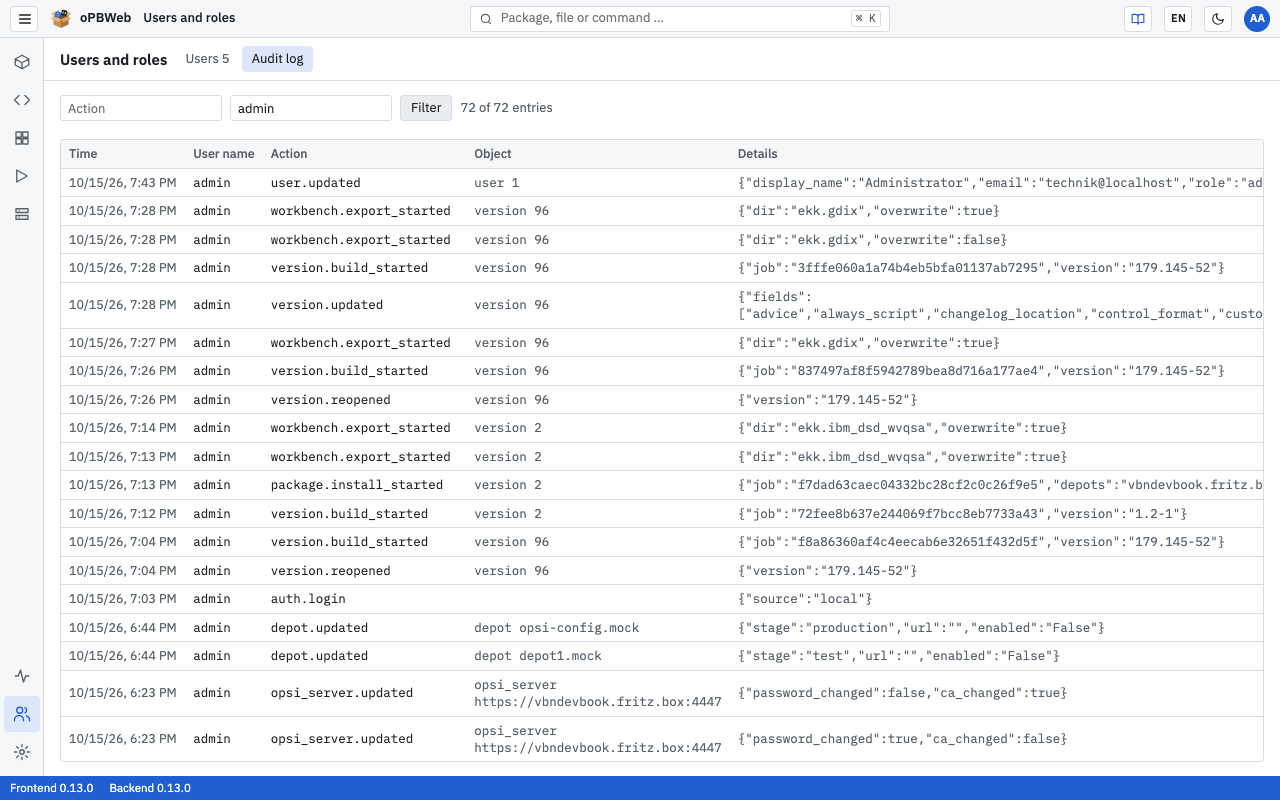
The newest entries are at the top. Each row has these columns:
| Column | Content |
|---|---|
| Time | Date and time of the action |
| User name | Who triggered the action. For failed sign-ins, the name that was entered. |
| Action | Technical key of the action, for example user.created (see list of actions
) |
| Object | Type and identifier of the affected object, for example depot depot01.example.local |
| Details | Additional information in JSON format, for example the changed fields or the reason for a rejected sign-in |
| IP | IP address the request came from |
Above the table, you see how many entries are displayed, for example “100 of 2,345 entries”. Entries are loaded 100 at a time. Use Load more below the table to fetch the next 100.
Action keys and details always appear exactly as oPBWeb stores them, that is in English and regardless of the selected language.
Filtering entries
- In the Action field, enter the beginning of an action key.
user.finds all actions on user accounts,auth.login_failedonly the failed sign-ins. - In the User name field, enter a user name. The name must be complete and match exactly.
- Click Filter.
You can combine both fields. To see all entries again, clear the fields and click Filter again.
Recorded actions
| Action | When it is recorded |
|---|---|
auth.login | successful sign-in |
auth.login_failed | rejected sign-in (reason in Details) |
auth.logout | sign-out |
auth.password_changed | user changes their own password |
user.created | account created |
user.updated | account edited (name, email, role, language, active) |
user.password_set | administrator sets a password |
user.unlocked | administrator lifts a lock |
user.deleted | account deleted |
package.created | new package or meta package created |
package.deleted | entire package deleted (Delete package …) |
package.archived | package archived; Details gives the number of deleted build results |
package.restored | archived package restored |
package.import_started | import of an .opsi file started |
package.install_started | installation on depots started |
package.uninstall_started | uninstallation on depots started |
version.updated | product data of a version saved |
version.properties | properties saved |
version.dependencies | dependencies saved |
version.files_uploaded | files uploaded into the package |
version.build_started | build started |
version.released | version released (when the installation starts) |
version.reopened | Back to draft |
version.copied | New version created |
version.deleted | version deleted |
depot.updated | depot settings changed (stage, service URL, enabled) |
depot.deleted | depot removed from oPBWeb |
depot.unlock | products unlocked on a depot |
depot.repository_delete | files deleted from a depot’s repository |
files.written | file saved on the server (Depots › Files) |
files.mkdir | folder created on the server |
files.moved | file or folder renamed on the server |
files.deleted | file or folder deleted on the server |
files.upload_started | upload to the server started |
workbench.import_started | import from the workbench started |
workbench.export_started | export to the workbench started |
snippets.imported | snippets imported |
settings.updated | settings for new packages, meta packages or changelog changed (changed keys in Details) |
opsi_server.created | config server added |
opsi_server.updated | connection data or stage of a config server changed |
opsi_server.deleted | config server removed with Remove … |
opsi_server.ca_accepted | Accept new certificate after a CA rotation |
storage.cleanup | object storage cleanup confirmed (only the deletion run, not the dry run) |
For actions that start a job (…_started), the audit log only shows who started the job. Whether it succeeded is shown under Jobs
.
What is not recorded
Some actions are deliberately not recorded in the audit log:
- new changelog entries
- saving file contents in the package (script editor)
- creating, moving, renaming and deleting files and folders in the package
- creating, changing and deleting individual snippets and snippet categories
- depot sync
- reading the repository and scanning the workbench
- Fetch from server (CA certificate) and Test connection
- the dry run when cleaning up object storage
Many of these actions still leave a trace: everything that runs as a job appears in the job list with the user who started it and its log.