Depot Management
Role: Administrator
Overview
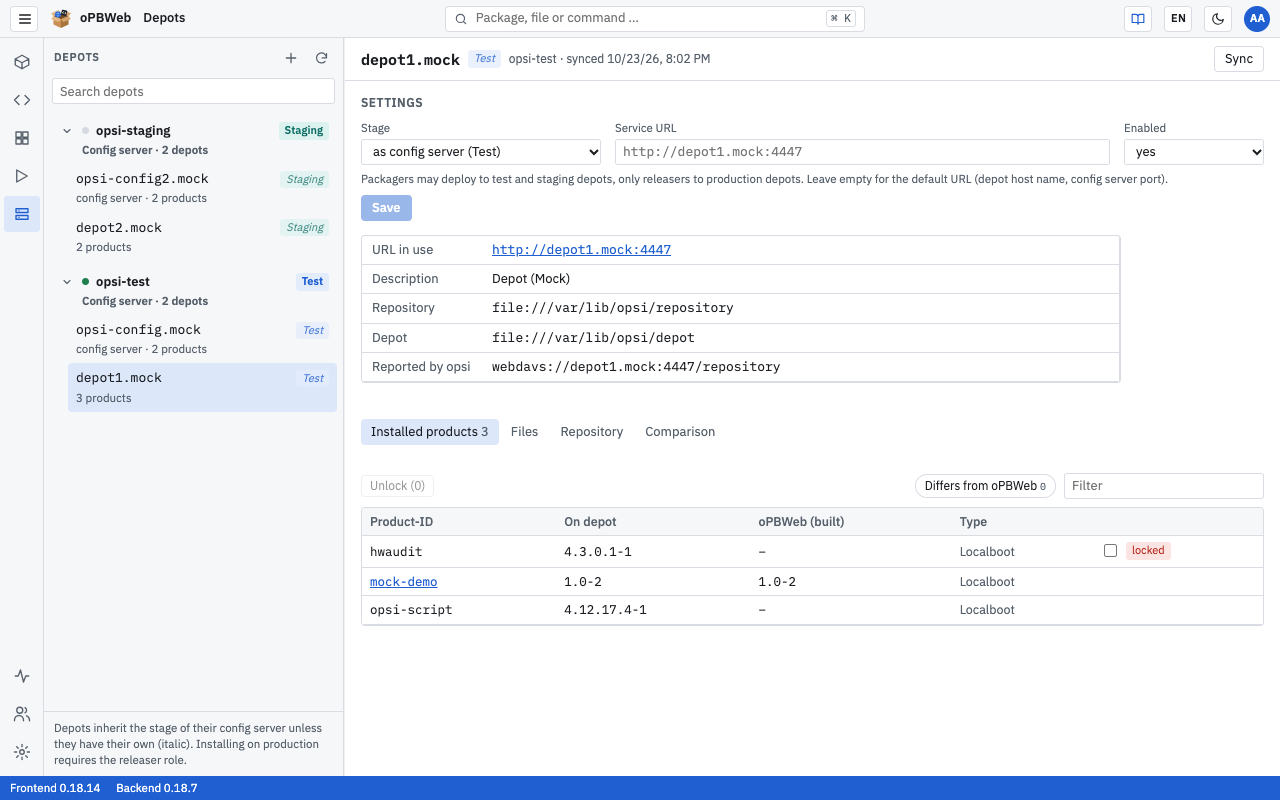
oPBWeb reads the list of depots from the configured opsi config servers. Each depot belongs to exactly one config server. As an administrator, you define for each depot which Stage it runs in, which Service URL oPBWeb uses to reach it and whether it is used at all (Enabled). The stage determines which role may install on the depot.
You find these settings under Depots. The list on the left is grouped by config server: each config server is shown as a bold row, with its depots indented below it, each with a stage badge and the number of products; for the config server’s own depot, for example, “config server · 120 products”. Additions such as “disabled” or “no longer present” also appear in the second line. How to add and maintain config servers is described in Config servers .
Select a depot on the left, and the Settings block is at the top on the right. All other roles only see the values; the fields are locked for them. The remaining functions of the depot view (installed products, files, repository, comparison) are described in Depots in the User Guide.
Stages: Test, Staging and Production
Every depot has one of three stages. It is shown as a badge in the depot list and in the depot’s header.
| Stage | Install, uninstall, unlock, delete from repository |
|---|---|
| Test | Packager and above |
| Staging | Packager and above |
| Production | Releaser and above |
This lets Packagers try out new packages on test and staging depots, while only Releasers and Administrators deploy to production depots. In the Install … dialog, a Packager sees production depots with the hint “requires releaser role” and cannot select them. The complete role overview is in Users and roles .
Inherited stage
Every config server has a stage of its own. Its depots take it over as long as you do not set a stage of their own for a depot. You recognize an inherited stage by the italic, lighter badge with the tooltip “inherited from the config server”. If you change the stage of the config server, the stage of all depots that inherit it changes too.
So it is usually enough to set the stage once on the config server: a test server gets Test, and all its depots are test depots. You only need a stage of their own for individual depots that should differ from their config server.
New config servers start in the Production stage, and new depots inherit the stage of their config server. This is intentional: no Packager should be able to deploy by mistake to a depot that nobody has classified. So set the stage of a test or staging server right when you add it.
Changing depot settings
- Open Depots in the activity bar and select the depot on the left.
- Set the fields in the Settings block:
- Stage — “as config server (stage)” (the stage is inherited), Production, Staging or Test.
- Service URL — address of opsiconfd on this depot, used by oPBWeb to upload packages and to access the depot’s files. Leave the field empty to use the default URL: the depot’s host name with the config server’s port, for example
https://depot01.example.local:4447. For the config server itself, the default URL is the Config server URL from its form . The default URL is shown as a gray placeholder in the field. - Enabled — yes or no. A disabled depot stays in the list but is locked for install, uninstall, unlock and repository deletion. In the Install … dialog, it appears as “disabled”.
- Click Save. The message “Settings saved” confirms this.
Below the fields, oPBWeb shows what actually applies: URL in use is the address oPBWeb uses to reach the depot; clicking it opens the depot in a new tab. You also see what opsi itself reports, such as the Repository and Depot paths and the URL under Reported by opsi.
You only need a custom Service URL if the depot cannot be reached by its host name or opsiconfd runs on a different port there. Use the host name here as well, not an IP address, so that certificate verification works.
How depots get into oPBWeb
oPBWeb syncs the depots with their config server:
- at every automatic check, that is every five minutes (default, configurable under Settings → Worker) for each reachable config server
- right after adding a config server and after Test connection in the config server form
- when a Packager or Administrator clicks Sync in Depots: in the header of a depot or of a config server, this syncs only that one config server (“Synchronize depots (name)”); ⟳ at the top of the list syncs all config servers (“Synchronize depots of all config servers”)
A sync never touches the depots of another config server. A sync via Sync or ⟳ also reads the workbench of the config server (for the “Workbench” information in the package list); the automatic sync does not; instead, the worker reads the workbench at its own interval (see Settings ). During a sync, the following applies:
| Situation | What oPBWeb does |
|---|---|
| The config server reports a new depot. | The depot is created with the inherited stage (“as config server”) and Enabled yes. |
| The config server reports a known depot. | The data from opsi and the installed products are updated. Stage, service URL and enabled state stay as you set them. |
| The config server no longer reports a depot. | The depot is kept with its settings and marked as “no longer present”. It is locked for all depot actions. |
| A depot marked as “no longer present” is reported again. | The marking disappears, and the previous settings still apply. |
| The reported depot already belongs to a different config server in oPBWeb (for example because the same server is set up under two URLs). | The depot is skipped; the job log reports “Depot … already belongs to config server … and is skipped”. |
Removing depots that have disappeared
A depot that the config server no longer reports stays in oPBWeb until you remove it. The detail view then shows “The config server no longer reports this depot. It is kept with its settings until an admin removes it.”
- Select the depot in the list.
- Click Remove in the header. The button only exists for depots that are no longer reported.
- Confirm the prompt “Remove depot depot01.example.local and its settings from oPBWeb? Nothing changes on the opsi server.”
The message “Depot removed” confirms this. You cannot remove depots that the config server still reports; set them to Enabled no instead. If you remove an entire config server, all its depots disappear with it (see Removing a config server ).
Additional administrator permissions
Besides the depot settings, you have some permissions in daily work that other roles lack:
- Cancel other users’ jobs: Under Jobs, you can stop any queued job with Cancel, not just your own. Running jobs cannot be cancelled, not even by administrators. More on this in Jobs .
- Maintain global snippets: Only administrators create snippets with the Visibility “Global (everyone)”, change and delete them, or import snippets into the global area. Everyone else sees global snippets; Packagers can take them over as their own copy with Duplicate. How to use snippets is described in Snippets .